What Is a Webhook?
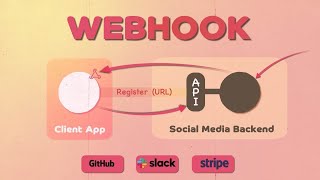
A webhook is a lightweight, user‑defined HTTP callback that delivers real‑time data from one application to another. Unlike traditional APIs, which require a client to pull information by sending requests, a webhook pushes data automatically as soon as an event occurs. This simple mechanism enables seamless integration between services, reduces latency, and eliminates the need for constant polling.
How Webhooks Work
When you register a webhook, you provide the target URL (the endpoint) where the source system should send a POST request. The source system monitors specific events—such as a new order, a comment, or a file upload—and, when the event triggers, it packages the relevant payload in JSON (or XML) and delivers it to the endpoint.
Request vs. Push Model
- Polling (request): Your application repeatedly calls an API endpoint to check for new data. This consumes bandwidth and can miss time‑critical updates.
- Webhook (push): The source system initiates the request, sending data instantly. Your application only processes incoming calls, which is more efficient and scalable.
Benefits Over Traditional Polling
Webhooks provide several practical advantages that make them a preferred choice for modern integrations:
- Reduced latency: Data arrives the moment an event happens, enabling real‑time workflows.
- Lower resource consumption: No need for scheduled API calls, saving bandwidth and compute cycles.
- Simplified architecture: One‑way communication eliminates the complexity of maintaining bidirectional connections.
- Cost efficiency: Many SaaS platforms charge based on API request volume; fewer requests mean lower bills.
Real‑World Use Cases
- E‑commerce notifications: Send an order‑confirmation payload to a fulfillment system as soon as a purchase is completed.
- CI/CD pipelines: Trigger a build job in Jenkins or GitHub Actions when code is pushed to a repository.
- Customer support: Push new ticket data from a help‑desk platform to a Slack channel for instant team awareness.
- IoT devices: Notify a monitoring dashboard when a sensor exceeds a threshold.
Setting Up a Webhook
Creating a webhook typically involves three steps:
- Define the endpoint: Build a server route that accepts POST requests and parses the incoming JSON payload.
- Register the webhook: Use the source application’s UI or API to specify the endpoint